
Guide / Email
Sending domains
Authentication, tracking and redirects for every domain you send from, in one checklist.
Where to find it
Sidebar → Email → Accounts → Sending domains (top right of the Accounts page).
Why it matters
Inbox providers judge the domain as much as the mailbox. A domain that is authenticated, uses its own tracking host and redirects to your website looks like part of a real company, which is one of the cheapest deliverability wins there is.
What you see
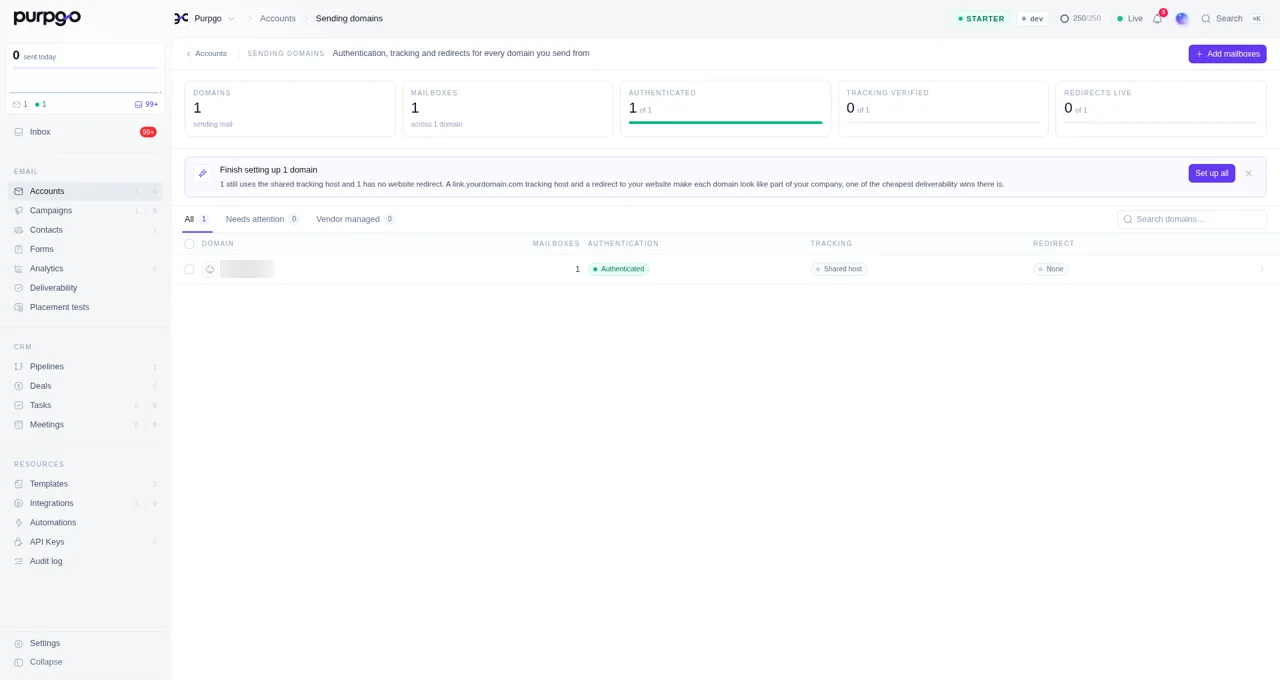
Counters show how many domains are sending mail, how many mailboxes they cover, and how many are authenticated, have a verified tracking host and have a live redirect.
When a domain still has work to do, a banner explains what is missing and offers Set up all. The table lists each domain with its mailbox count and the state of authentication, tracking and redirect. Filter by All, Needs attention or Vendor managed.
Finishing a domain
- 1Authentication: confirm the domain shows Authenticated.
- 2Tracking: move off the shared tracking host to a link on your own domain, such as link.yourdomain.com.
- 3Redirect: point the bare domain at your website so curious recipients land somewhere real.
Ready to try it? Open app.purpgo.com →